
Celebrations: Birthdays, Anniversaries and Attendance Milestones
Celebrations help your studio cheer clients on. On a client's birthday, on the anniversary of their first year with you, and when they hit an attendance milestone, Recess makes sure they (and your coaches) know about it.
Clients get a push notification and a celebration in the app. Coaches see the client's row turn gold on the class roster, so they can say happy birthday or well done in person.
📌 In this article:
- Before you start: turn on Achievements
- Turning on Celebrations
- What coaches see on the class roster
- What clients see in the app
- Birthdays and anniversaries
- Attendance milestones
- Tips
⚙️ Before you start: turn on Achievements
Celebrations are part of Achievements, so turn that on first.
- Go to Tools > Profile > Settings.
- In the left menu, under Clients, click Progress Journey.
- Turn on Achievements.
- Click Save.
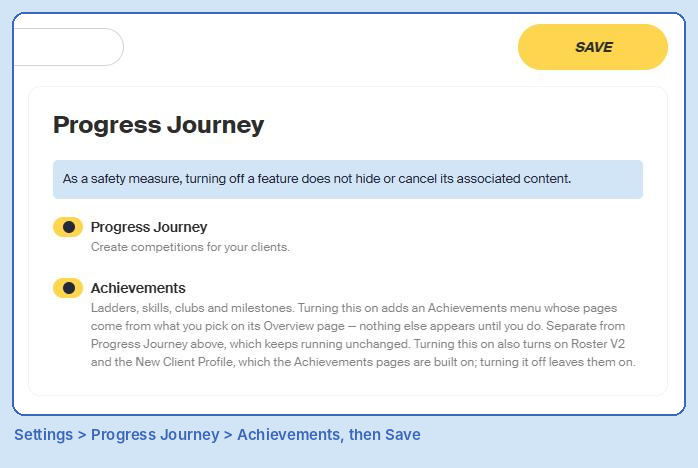
An Achievements menu now appears on the left of your dashboard.
📝 Note: Turning on Achievements also turns on the new class roster and the new client profile. Turning Achievements off later leaves those on.
⚙️ Turning on Celebrations
- Go to Achievements > Overview.
- Scroll down to Celebrations.
- Turn on Highlight on the class roster to show celebrations to your coaches.
- Turn on Celebrate in the app to celebrate with your clients.
- Under Cheer after class, choose how often clients get a cheer after they come to class:
- Every class (recommended)
- Once a week at most: Best for martial arts and afterschool, where students come often.
- Under Welcome back after this many days away, set how long a client has to be away before they get a welcome back (30 days by default).
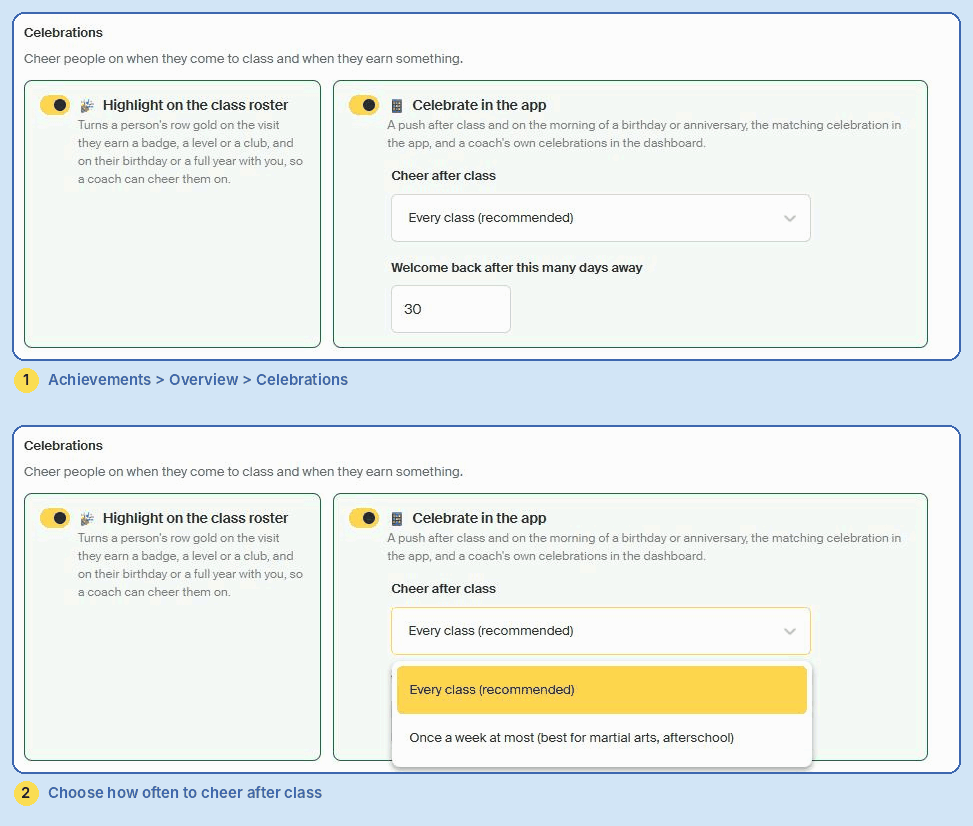
📝 Note: Changes on the Overview page save automatically. There's no Save button.
💡 Tip: You can use either toggle on its own. For example, turn on the roster highlight only if you'd rather coaches celebrate in person and you don't want to send pushes.
📋 What coaches see on the class roster
With Highlight on the class roster turned on, a client's row turns gold on the class roster when:
- It's their birthday.
- It's a full year since they joined your studio.
- They earn a badge, a level or a club during that visit.
A tag under their name says why, like Birthday today.
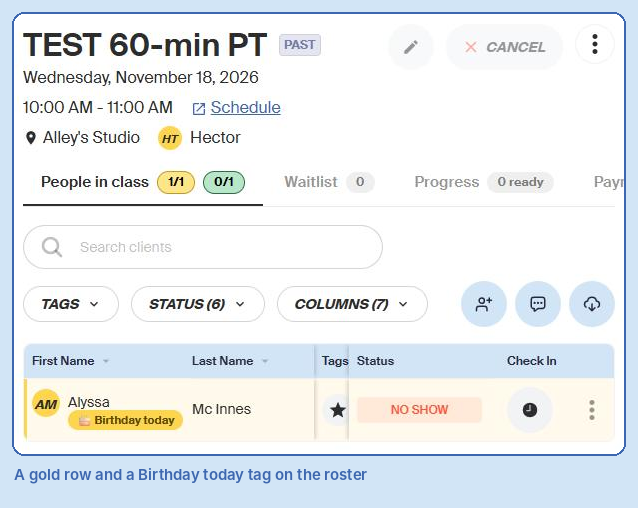
To see it, open any class from Schedule & Programming > Calendar and check the People in class tab.
📱 What clients see in the app
With Celebrate in the app turned on, clients get:
- A push after class, cheering them on for coming in (as often as you set under Cheer after class).
- A welcome back when they return after the number of days you set.
- A push on the morning of their birthday or anniversary.
- A matching celebration in the app when they open it.
Coaches also see their own celebrations in the dashboard.
🎂 Birthdays and anniversaries
You don't need to set anything up for these. Recess uses the details already on each client's profile:
- Birthday: The birthday on the client's profile.
- Anniversary: A full year from their Member Since date.
⚠️ Important: If a client has no birthday on their profile, they won't get a birthday celebration. To add one, open their profile, click the pencil next to Overview, choose their Birthday and click Save.
💡 Tip: Ask for birthdays on your sign-up form so new clients are covered from day one.
🏆 Attendance milestones
Milestones are badges for the total number of visits a client has made to your studio, like 10, 25, 50 and 100 classes. Each one is earned once and never taken away. When a client hits one, it's celebrated on the roster and in the app.
First, make sure Milestones is turned on under Achievements > Overview > What this studio uses. Then:
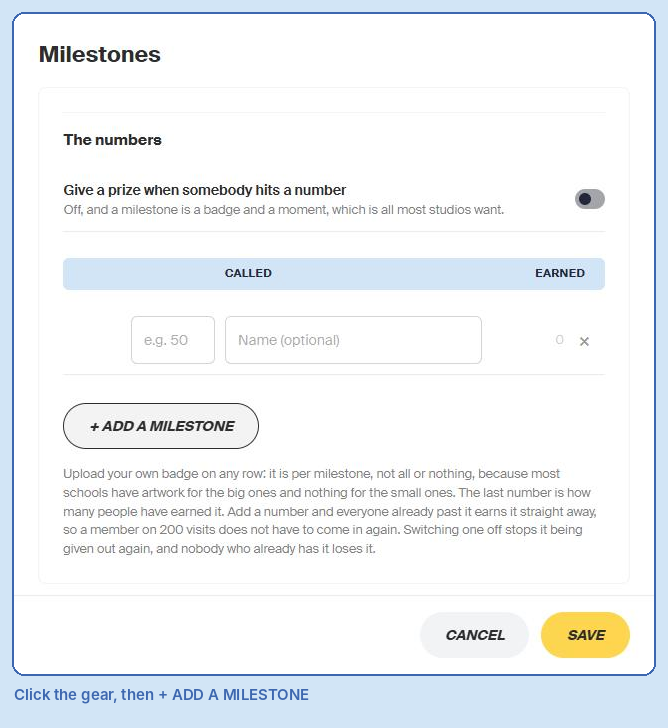
- Go to Achievements > Milestones.
- Click the gear icon at the top.
- Click + Add a Milestone.
- Enter the number of visits, and a name if you want one.
- Optional: upload your own badge for that milestone.
- Repeat for each milestone.
- Optional: turn on Give a prize when somebody hits a number.
- Click Save.
The Milestones page shows everyone with a visit, how many visits they have, their last badge and what's next. Use Close to one and Earned one this month to filter the list, and Print Certificates to print certificates for the badges they've earned.
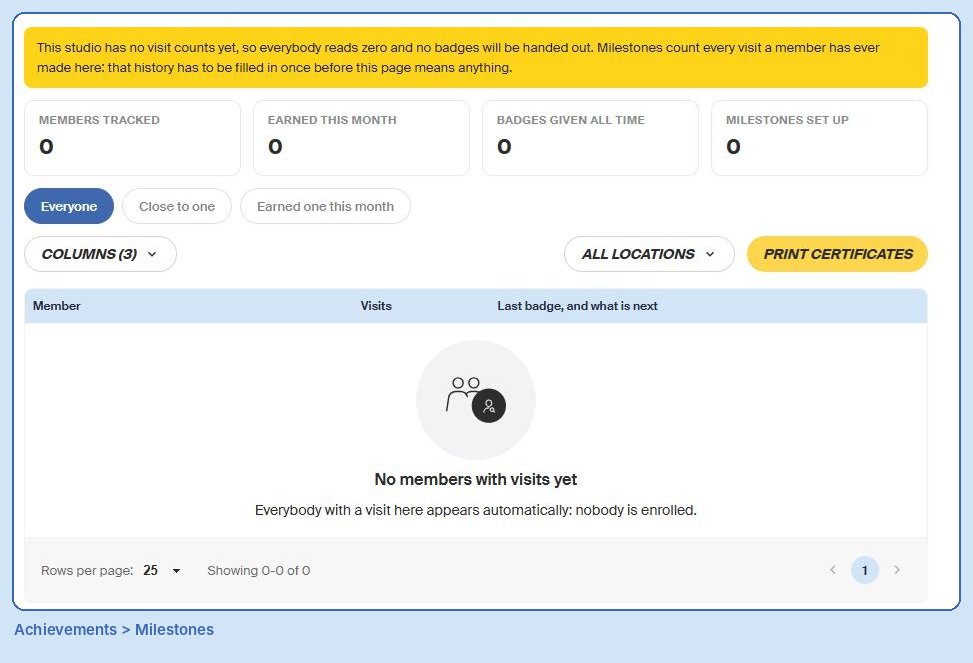
📝 Note: Milestones count every visit a client has ever made. If you see a message saying your studio has no visit counts yet, your visit history needs to be filled in once before badges can be given out. Contact support and we'll help.
📝 Note: If you add a milestone that clients have already passed, they earn it straight away. Switching a milestone off stops it being given out, but nobody who already has it loses it.
💡 Tips
- Start with a simple set of milestones, like 10, 25, 50 and 100 visits.
- Check the roster before each class. A gold row is the perfect cue for a shout-out.
- Use Once a week at most if your clients train several times a week, so the after-class cheer doesn't get repetitive.
- Keep client birthdays up to date. Celebrations can only use what's on the profile.
💬 Need Help?
Contact our support team at support@recess.tv if you have questions about Celebrations.